How to Download and Understand a Digitally Signed RTC in Karnataka – 2025 Guide
Accessing a digitally signed RTC (Record of Rights, Tenancy, and Crops) in Karnataka is a key step for managing land records effectively. This detailed guide, updated for 2025, explains how to download and interpret your digitally signed RTC through our platform. Whether you’re a landowner, farmer, or involved in legal proceedings, this resource will help you navigate the process with ease and confidence.
What is a Digitally Signed RTC?
A digitally signed RTC is an electronically authenticated land record document provided via the Bhoomi system in Karnataka. Unlike traditional paper RTCs, this version features a secure digital signature from the Revenue Department, ensuring its authenticity and protecting against fraud. It includes essential details such as ownership, tenancy, crop information, and any liabilities tied to your property. Learn more about getting started with logging into your account to access this document.
Why Use a Digitally Signed RTC?
In 2025, this verified RTC Document offers numerous advantages for Karnataka residents. Here’s why it’s worth using:
- Legal Recognition: Accepted for property transactions, court cases, and loan applications.
- Enhanced Security: The digital signature prevents tampering, offering peace of mind.
- Time-Saving: Download it instantly without visiting an office, as outlined in our troubleshooting tips if issues arise.
- Up-to-Date Records: Reflects the latest land details for accurate decision-making.
Steps to Download a Digitally Signed RTC in 2025
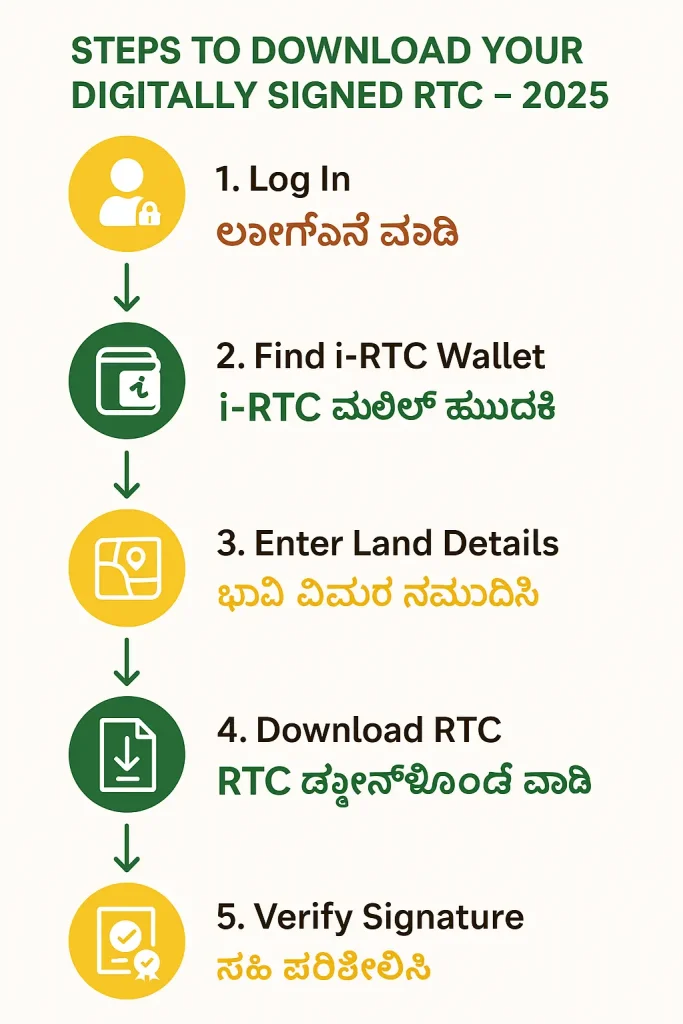
Follow these clear steps to download your Verified RTC Document using our guidance. Ensure you have your login credentials ready, which you can set up via our login guide.
- Access Your Account: Start by navigating to your personalized dashboard after logging in on official site.
- Locate the i-RTC Wallet: Find the “i-RTC Wallet” section, a feature designed for secure document access.
- Input Land Details: Enter your district, taluk, hobli, village, and survey number to retrieve your RTC. Verify these details to avoid errors.
- Download the Document: Click “Download” to save RTC Document as a PDF, complete with authentication.
- Verify Authenticity: Open the PDF in Adobe Acrobat Reader to check the signature panel for a valid digital signature. Refer to our homepage if verification fails.
Visual Guide: Downloading a RTC Document
Understanding Your RTC Document: A Breakdown
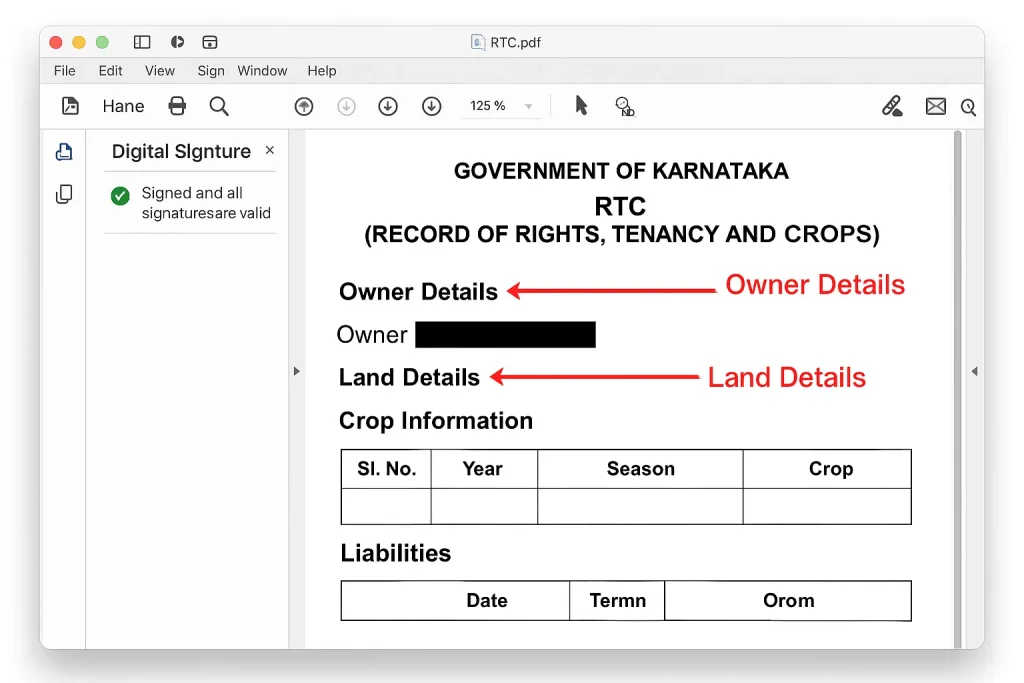
Once downloaded, your RTC contains vital information. Here’s a detailed overview to help you interpret it:
| Section | Description |
|---|---|
| Owner Details | Displays the landowner’s name, father’s name, and contact details. |
| Land Details | Shows the survey number, land extent (in acres), and classification (e.g., agricultural). |
| Crop Information | Lists crops cultivated, updated yearly (e.g., paddy, cotton). |
| Liabilities | Highlights any loans or encumbrances, which can affect land use. Check mutation status for updates. |
| Digital Signature | Confirms authenticity, signed by the Karnataka Revenue Department. |
Frequently Asked Questions (FAQs)
What is the fee for a digitally signed RTC?
A small fee (approximately ₹15-₹20) applies, payable online.
Is it valid for legal use?
Yes, it’s legally recognized for transactions and disputes, thanks to its digital authentication.
What if the signature verification fails?
Use Adobe Acrobat Reader to verify. If issues persist, check our rtcbhoomi guide or contact support.
Can I get it in Kannada?
Yes, select Kannada during download. We also offer Kannada guides on our login page.
Explore More Resources
Discover additional land record insights with our guides on checking mutation status, viewing SSLR revenue maps, and Bele Parihara list.
ಡಿಜಿಟಲ್ ಸಹಿ ಮಾಡಿದ RTC ಡೌನ್ಲೋಡ್ ಮಾಡುವುದು ಹೇಗೆ? (How to Download a Digitally Signed RTC in Kannada)
ಕರ್ನಾಟಕದಲ್ಲಿ ಡಿಜಿಟಲ್ ಸಹಿ ಮಾಡಿದ RTC ಡೌನ್ಲೋಡ್ ಮಾಡಲು ಈ ಹಂತಗಳನ್ನು ಅನುಸರಿಸಿ:
- ನಿಮ್ಮ ಖಾತೆಗೆ ಲಾಗಿನ್ ಮಾಡಿ.
- ‘i-RTC ವಾಲೆಟ್’ ಆಯ್ಕೆ ಮಾಡಿ.
- ನಿಮ್ಮ ಜಿಲ್ಲೆ, ತಾಲೂಕು, ಹೊಬ್ಲಿ, ಗ್ರಾಮ ಮತ್ತು ಸರ್ವೇ ಸಂಖ್ಯೆ ನಮೂದಿಸಿ.
- ಡಿಜಿಟಲ್ ಸಹಿ ಮಾಡಿದ RTC ಡೌನಲೋಡ್ ಮಾಡಿ.
- ಸಹಿಯನ್ನು ಪರಿಶೀಲಿಸಿ ಎಂದು ಖಚಿತಪಡಿಸಿಕೊಳ್ಳಿ.